Technology · Technical network
Technical network
The technical systems in a modern building are increasingly networked. The building management system, meter collection, lighting control, access control, surveillance and other systems communicate over IP and often share the same physical network infrastructure.
That opens good opportunities for integration and data exchange, but it also means the network has to be designed as part of the building's technical infrastructure.
A good technical network has to be stable, clear, documented and divided, so that each system only has access to what it needs.
02Building management, meters and lighting on the same technical VLAN
The building management system, energy and meter collection and central lighting control often have a natural need to exchange data.
A building management system may need energy data, while an analysis tool above it may need temperatures, operating states, lighting status and measurements alike.
These systems can therefore be placed on the same technical VLAN to advantage, when security and project-specific conditions do not argue against it.
Sitting on the same VLAN does not mean that every device should be able to communicate freely with every other. Firewall rules and access control can still be used between the relevant systems and network areas.
03Access control and surveillance are kept separate
Access control, intruder alarms and CCTV handle a different type of information and have a different security profile from ordinary building automation.
We therefore recommend that these systems are not placed directly on the same VLAN as the building management system and the ordinary technical data collection.
CCTV should have its own VLAN as a starting point. Video traffic can also be considerably heavier than ordinary building automation, which in itself argues for a separate network zone.
04Managed switches as the backbone
Main components should as far as possible be connected to managed switches.
That makes it possible to see where equipment is connected, to monitor connections, to use VLANs and to control the communication between different parts of the installation. Central switches should at the same time be placed in locked technical or server rooms.
It is not necessarily sensible to run a separate network cable from every single technical component back to a central switch. Local switches and daisy-chained controllers can make sense, for example inside a building management cabinet, when it is done in a controlled and documented way.
05Someone has to own the network architecture
One of the most important organisational decisions is to place the responsibility for the technical network.
If every contractor chooses their own IP addresses, subnets, gateways and internet connections, the result quickly becomes hard to administer.
There should therefore be one responsible function with an overview of IP ranges, VLANs, firewall rules and which systems are allowed to communicate with each other or with the internet.
It can be the client's own IT organisation, an operations organisation or an external partner. What matters is that the responsibility is clearly placed.
06Internet access has to be an active choice
A technical system does not need internet access just because it is IP-based.
Some systems have a real need to connect to external services. Others only need to communicate locally in the building.
The starting point should therefore be that internet access is opened when there is a specific need. The same goes for communication between the technical VLANs.
That way the connections become a deliberate design choice, rather than the result of every system being able to communicate with everything by default.
Fixed addresses or DHCP?
A device on an IP network needs an address. Either it is set on the device itself, or the device is handed one by a DHCP server when it powers up.
On a technical network, fixed addresses are the norm, and for good reason. Integrations, firewall rules, point lists and documentation all refer to the address. If a controller changes address because it was switched off over a weekend, the connection stops working and the documentation no longer matches. Troubleshooting is also simpler when an address always belongs to the same device.
The price is that every address has to be maintained by hand, and that one typing error gives two devices the same address.
The middle road is to run DHCP with reservations. The device asks as usual, but the server always answers with the same address, because it is tied to the device's MAC address. The list then lives in one place and can be maintained there, instead of being spread across a hundred devices that each have to be visited.
Whichever is chosen, one rule applies: there may only be one DHCP server on the technical network. A router somebody plugs in to get an extra port, and which starts handing out addresses, is a classic way to bring a technical network down. That is also why disabling unused ports belongs with the managed switches, see IT security and data.
07Documentation is part of the installation
A network that works well is not worth much if nobody can make sense of it five years later.
Network topology, VLANs, IP ranges, fixed addresses, gateways and the significant firewall connections should therefore be part of the building's as-built documentation.
The same goes for the link between the network and the technical data points. Point lists should, for example, make it possible to identify a point, its device, its object type and which component or system it belongs to.
What the list can look like
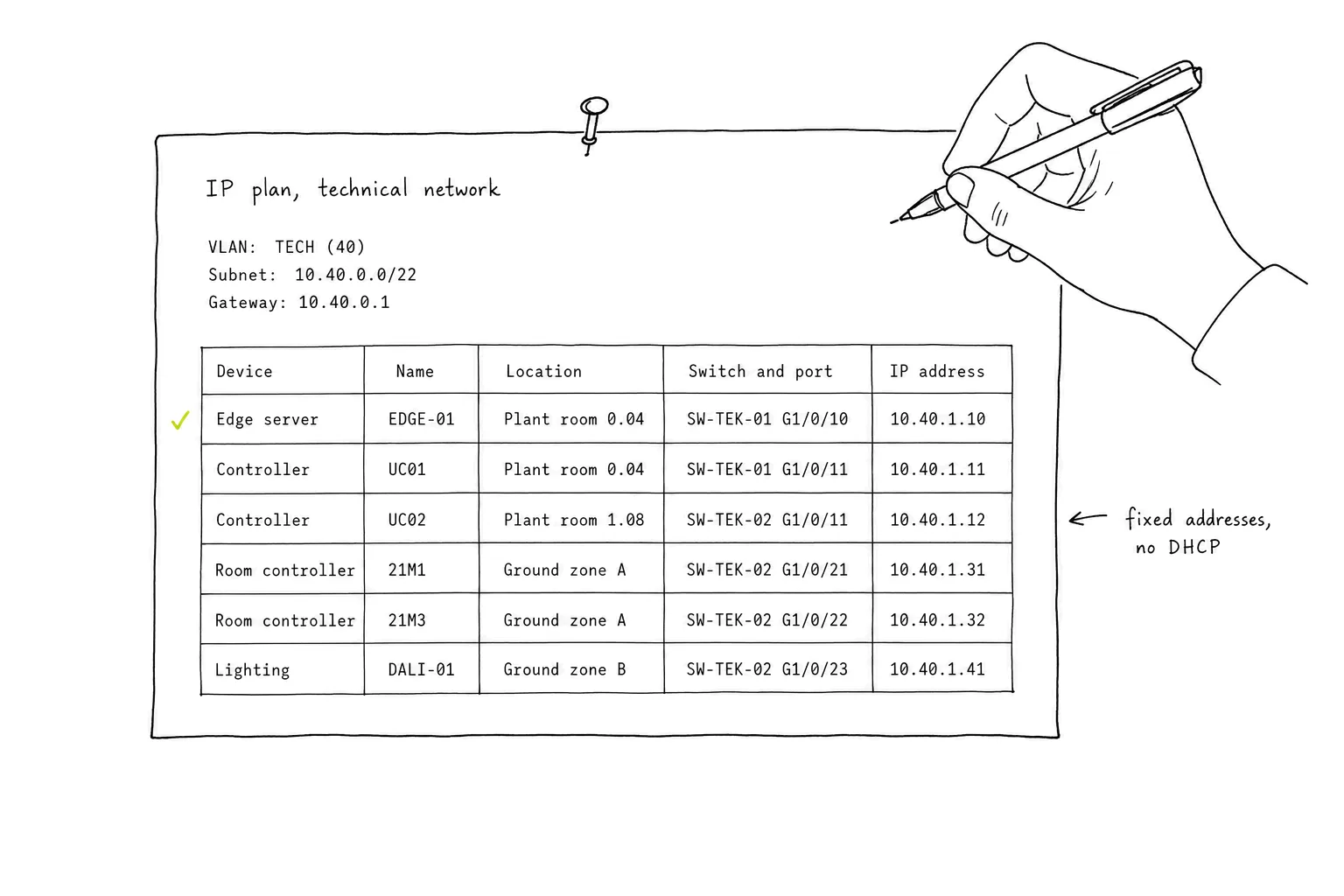
The list itself does not have to be sophisticated. A spreadsheet with one line per device goes a long way, as long as it is filled in along the way rather than reconstructed afterwards.
 Tap for full size
The header is filled in by whoever owns the network architecture: VLAN, address range and gateway. The lines are filled in by the trades that put equipment on the network, and each line ties a device to a physical port and a fixed address. A socket can then be found from an address and the other way round, without anyone having to guess.
Devices that sit behind a gateway and have no IP address of their own belong in the point list rather than here, see Protocols.
The network documentation tells you how to reach the data. The technical documentation tells you what the data means.
08A good foundation for building data
First and foremost, the technical network has to support the building's technical systems safely and stably.
But if the network is also well documented, segmented and gives controlled access to data, it becomes far easier later to connect analysis tools, data platforms and other systems.
The goal is not a complicated network. The goal is a technical infrastructure that can be understood, controlled and developed further.
Do you have a technical question?
Book a 45-minute meeting, or write to us.